
Updates to SMS and the Two-Way SMS portal, helping make messages more recognisable to clients and better aligned with SMS best practice.
It’s best practice, and in some cases required, that commercial SMS messages:
The following updates help make your messages more recognisable to clients and support alignment with SMS best practice.
To help your clients identify your business, the Two-Way SMS portal — where clients can reply to your messages and view shared photos or files — now displays your business name and ABN/Business Number at the top of the thread, just below your logo.
For example:
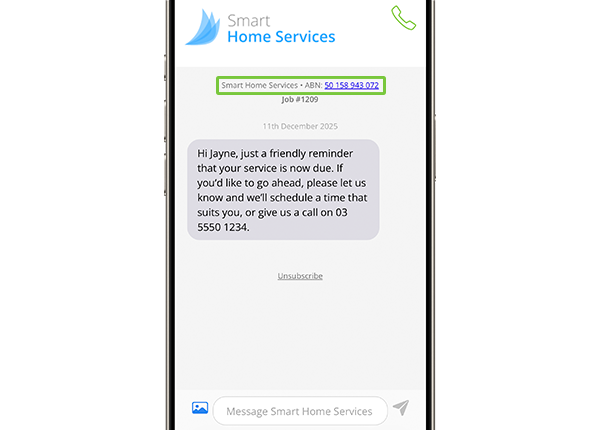
TIP: confirm your business details are correct in Account > Settings > Preferences > Company Information > Company Details.
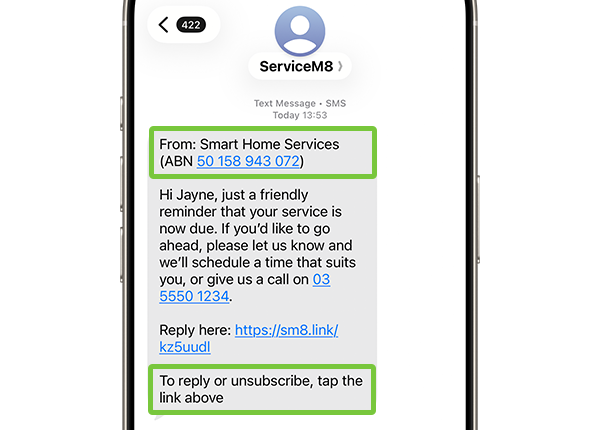
If you’re in Australia and use ServiceM8’s standard SMS service (i.e. your messages are sent under the ‘ServiceM8’ Sender ID, not your own name with Branded SMS), then some messages you send will now include a header and footer automatically:
Header:
FROM: [Business Name] [ABN]
Footer:
To reply or unsubscribe, tap the link above
For example:
When is the header & footer added?
The header and footer will not appear in every SMS you send — they are only added in certain situations, such as:
If you use Branded SMS with your own custom Sender ID (e.g. your texts appear from “EzyPlumbing” instead of “ServiceM8”), this change does not apply to you, and the header and footer will not be added to your SMSs.
Where is the header & footer visible?
The header and footer are only added to the SMS body as seen by your client — they only appear in the recipient’s Messages app, like the existing “Reply here” link. These parts of the message will not be visible in the job’s Diary or the Two-Way SMS portal.
These updates help ensure clients can clearly see:


